Thursday, December 31, 2009

Science Club can help you build your Kids School project

Its nothing new to hear parents getting scare of projects that are being asked in school for exams but then it’s totally unavoidable.  Most of us get online, find some old project, find how to do it and then just do it for the sake of doing it but The Science Club can help you in getting over it and also cheer your kid.
This online non-profit educational corporation is an extremely handy resource for science projects for kids and even grown ups.  With a collection of huge amount of projects with in detail on how to do it and with live videos which demonstrates step by step instruction of development of a project helps your kid actually understand it and make sure you help them right.
The Science club

Launch Apps From Windows Mobile Phone Home Screen

Just in case you are looking forward for a tool that will enable you to launch apps from your windows mobile phone, you basically need TitaniumStarter v2.00.
DESCRIPTION :
TitaniumStarter is plugin that lets you launch apps from WM 6.5 Home Screen. Just install to the Main Memory like every Titanium Plugin.
TitaniumStarter v2.00

BlueMaemo Emulator: Nokia N900 as a PS3 Controller

BlueMaemo-N900
You can now use your Nokia N900 as a PS3 controller with the help of BlueMaemo emulator which is a free application and is available under the Extras Devel Alpha repository in the Catalogues. This application allows you to use your Nokia N900 as a Keyboard, Media Remote, Controller etc for the Playstation 3 gaming system.

Wednesday, December 30, 2009

Setup a Virtual Private Network in Minutes

VPN Tutorial Virtual Private Networks, or VPN for short, allow employees to securely connect their desktop or laptop computers to the office network from any location in the world using a regular Internet connection.
If you are working from home, you can connect to the corporate network over VPN and you’ll have immediate access to your emails, internal web pages, network drives, and stuff that is otherwise only available from computers within the office premises. Some VPN clients also allow screen sharing and remote access to facilitate communication among team members.

How To Restrict Access To Drives In My Computer In Windows

If you have a shared or public computer that several people use, you might want to restrict access to it’s drives to prevent users from deleting important data. Today we look at restricting access to some or all drives on the machine using Local Group Policy.
Note: This method uses Local Group Policy Editor which is not available on home versions of Windows 7 or Vista
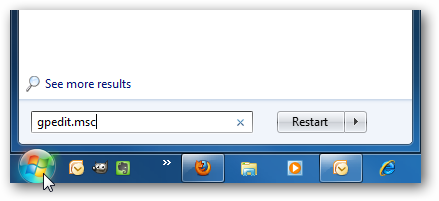
First type gpedit.msc in the search box of the Start Menu and hit Enter.
gpedit_start

Related Posts with Thumbnails